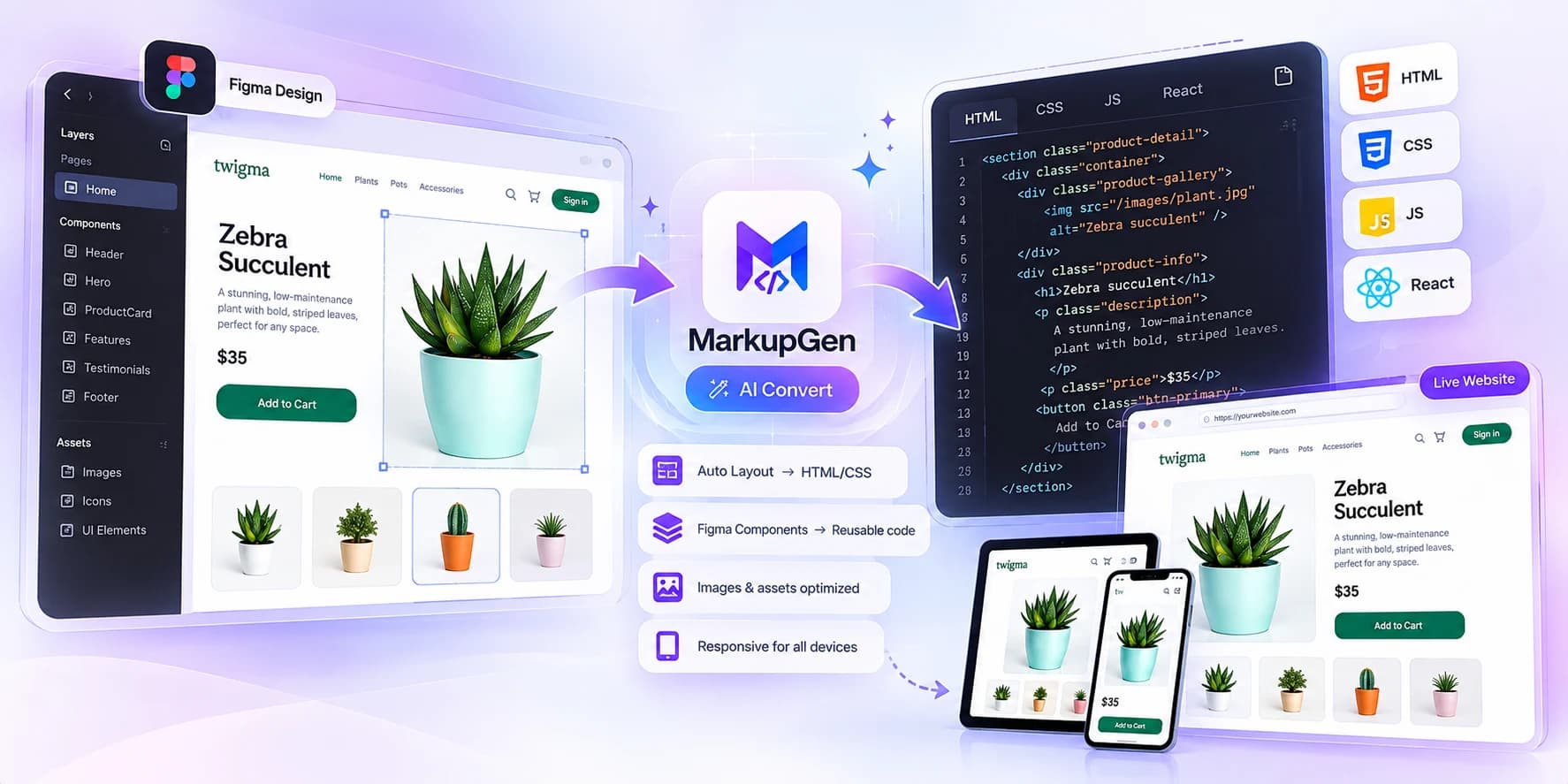
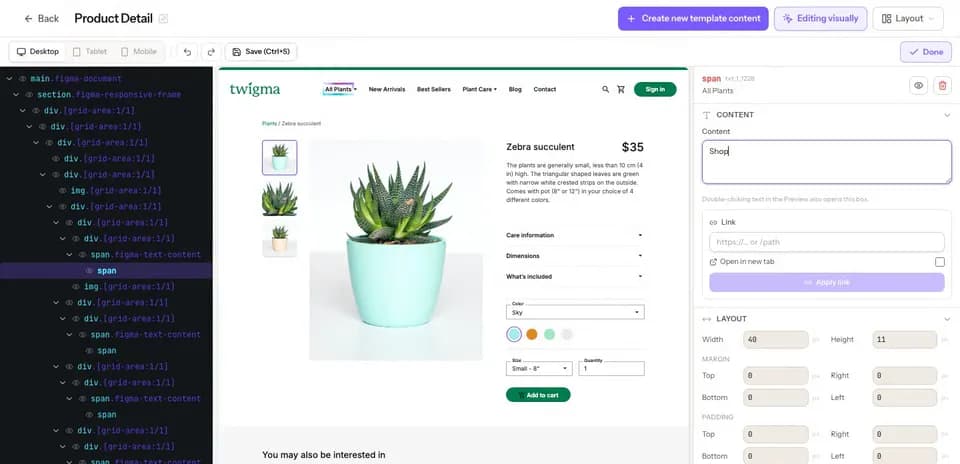
Turn Figma designs into clean, responsive code. MarkupGen maps Auto Layout to Flexbox, outputs the CSS stack you choose, and lets you refine the result in a visual editor before you export.
MarkupGen reads your design, generates clean HTML/CSS, and lets you fine-tune every detail visually.
product-detail.html
markupgen.comLive
Design → Code → Edit → Done.
With MarkupGen
Process
From design to product in three steps
Every stage has a clear state: input, progress, output quality and the next action.
Export from Figma
Use the Figma plugin MarkupGen to export the selected frame — structure, styles and images will be sent to our system.
Build with AI
MarkupGen runs your design through Gemini, Claude, Cursor and DeepSeek to generate real HTML/CSS.
Powered by
Export
Download clean, SEO-ready HTML/CSS or share directly when the output is ready.
Features
What MarkupGen does differently
Five capabilities, each with the specifics of how it works, so you can judge the output before you sign up.
Auto Layout becomes real Flexbox
MarkupGen reads the Auto Layout settings stored in your Figma file and writes the matching Flexbox rules, so spacing comes from the design instead of being estimated from a picture. Nested Auto Layout frames become nested flex containers.
Choose the Responsive HTML output to get a fluid layout instead of fixed pixel positions, then add breakpoint-specific layouts when the design needs them.
Responsive HTML mode generates a layout that adapts to different screen widths
Ask the AI for a separate mobile or desktop layout, written as its own media query (767px and 992px by default)
Preview the new layout before you apply it. Complex designs can still need manual adjustments
Exports use meaningful tags instead of a wall of divs, which makes the code easier to maintain and gives you a sound base for SEO and accessibility work.
header, nav, main and footer landmarks are applied when the page structure is clear, and left alone when it is ambiguous
One H1 is inferred from the main headline. Statistics and promo text are not turned into headings
Markup is a starting point: it does not guarantee rankings or accessibility compliance, so review it for your content
Vanilla CSS, Tailwind CSS and Bootstrap are included in the Free plan. Bulma, Materialize and Pico CSS require a paid plan.
Component export for JavaScript frameworks
Export the same design as React, Vue, Svelte or Angular components: one framework at a time from the Starter plan, or all of them in a single ZIP on Pro.
For freelancers & professionals — a much bigger daily quota, a higher AI request rate, and a professional export workflow with the Full Component Export Studio.
Prices are in USD. Taxes may be added at checkout depending on your country. Cancel anytime. Secure payment by Lemon Squeezy.
Frequently asked questions
Everything you need to know about MarkupGen. Can't find an answer? Contact us.
MarkupGen converts Figma designs into clean HTML, CSS and React code. Paste a Figma link or use the plugin, and our AI builds semantic markup that you can refine in the editor before exporting.
Not at all. The generated code is ready to use out of the box. You can refine content, fonts and layout visually in the editor, then export the final package.
We support six CSS output formats: Vanilla CSS, Tailwind CSS, Bootstrap, Bulma, Materialize and Pico CSS — pick whichever fits your project, or let MarkupGen match your existing stack automatically.
Yes. Your projects are private to your workspace. We only access the Figma frames you explicitly import, and never use your designs to train models for other customers.
Absolutely. You can cancel or change your plan anytime from the billing settings — no questions asked.
Your projects stay available indefinitely. The free plan includes a basic monthly code generation quota — upgrade anytime for higher limits.
Both. Pick React as your export format and MarkupGen outputs React components; pick one of the six CSS formats (Vanilla CSS, Tailwind CSS, Bootstrap, Bulma, Materialize, Pico CSS) and it outputs plain HTML/CSS instead.
Yes. Exports are clean, semantic HTML/CSS or React components with no vendor lock-in — copy the files into your own codebase and wire them up like any other component or page.
Dev Mode inspects a design layer by layer and gives you values and code snippets to assemble yourself. MarkupGen takes a whole frame and outputs a complete, ready-to-use file — the two are complementary rather than competing.
Yes, Tailwind CSS is one of six supported output formats, alongside Vanilla CSS, Bootstrap, Bulma, Materialize and Pico CSS.
Yes — the Free plan is free forever, with a basic code generation quota and standard Figma design size support. Paid plans start when you need larger design size capacity, expanded generation limits, or other CSS/React export formats.
The Free plan runs on basic AI models. From Starter upwards, MarkupGen uses advanced AI models for more accurate output.
On paid plans, AI Evaluation compares the generated page with the original Figma frame and rates the match from 0 to 10 across layout, spacing, typography, color, content and dimensions, with specific suggestions when something is off, so you're not guessing at accuracy.
Yes. Beyond the responsive CSS generated by default, you can ask the AI to build a distinct mobile layout with its own media queries, preview it, and apply it separately from the desktop layout.
Yes. The Business plan is built for that: maximum generation capacity, unlimited projects, and dedicated 1-on-1 support for teams running several client projects in parallel.
Turn your next Figma frame into code
Turn your Figma designs into clean, responsive, SEO-ready HTML/CSS with AI — including Auto Layout to Flexbox conversion.
Semantic HTML · Auto Layout → Flexbox · Responsive by Default