MarkupGenMarkupGen
ProcessDemoFeaturesFormatsPricingFAQ
Log inConvert for Free
  1. MarkupGen
  2. /Figma to Vue
Figma → Vue 3 Components

Convert Figma to Vue 3
Components with AI

Turn any Figma design into clean, reusable Vue 3 single-file components in seconds — <script setup> SFCs, Auto Layout mapped to Flexbox, nothing left to hand-code. Free Figma plugin — no design handoff required.

Convert Figma to Vue → See how it works
MarkupGen — Editor4 changes saved
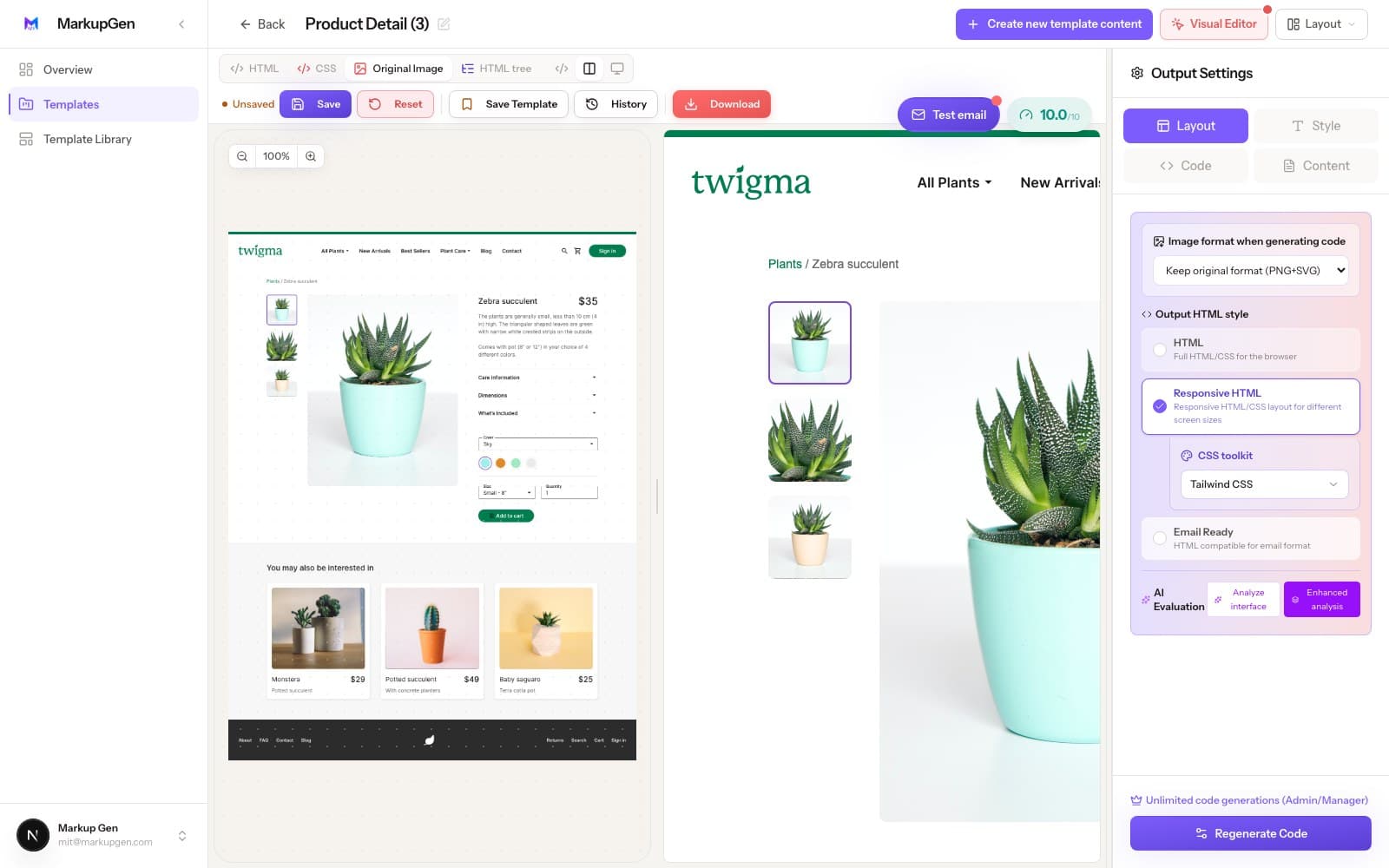
MarkupGen converting a Figma design to Vue 3 components
Figma → Code in seconds

What MarkupGen actually gives you

No vanity metrics — just what the converter does for every export.

Free Figma pluginNo design handoff — install and export straight from Figma
Semantic HTML by defaultReal headings and landmarks, not nested div soup
Editable, not a black boxEvery export opens in an editor before you ship it
Multiple output formatsHTML, CSS, Tailwind, Bootstrap, React and more
3 steps

How it works

From Figma frame to Vue 3 in 3 steps

No manual re-measuring, no guessing breakpoints — export, generate, refine.

Export the frame

Grab the MarkupGen Figma plugin and export any frame — structure, styles and images land in your workspace in one step.

AI builds Vue 3 components

MarkupGen runs the design through Gemini, Claude, Cursor and DeepSeek to generate real Vue 3 single-file components from the design's actual structure — not one giant file.

Powered by

Refine, then export

Fine-tune content, fonts and layout in the in-app editor, then export clean, ready-to-ship code.

Why hand-coding this is slower than it looks

What manual Figma-to-Vue conversion actually costs you

MarkupGen exists to remove exactly these steps.

Re-measuring spacing by hand

Every gap and padding value already exists in the Figma file — eyeballing it into code just invites small inconsistencies across sections.

Guessing breakpoints

A design that only exists at one fixed width leaves you guessing where content should wrap on smaller screens.

Divs stacked on divs

Manual exports and most plugins produce deeply nested, unlabeled markup that's hard to read and bad for SEO.

From Figma to production code — in seconds

MarkupGen reads your design, generates clean HTML/CSS, and lets you fine-tune every detail visually.

product-detail.html
markupgen.comLive

Design → Code → Edit → Done.

Why the output holds up

Built to be clean code, not just matching pixels

Every conversion is judged on the same bar a developer would use for code they'd actually ship.

Vue 3 SFCs with <script setup>, not one file

Repeated layers become reusable Vue 3 single-file components with <script setup lang="ts">, instead of a single sprawling page you have to break apart yourself.

Semantic, SEO-ready markup

No unnecessary nested divs — proper heading hierarchy and meaningful tags by default.

Auto Layout → Flexbox

Direction, gap, padding and alignment map to a single, coherent Flexbox structure automatically.

Responsive by default

Breakpoints and fluid layouts are generated from the design's own Figma resizing constraints.

Automatic quality score

Every export is scored so you know how close it is to shippable before you commit to it.

Editable, not a black box

Refine content, fonts and layout visually in the editor before you export the final code.

Every CSS flavor, one export

Choose the exact format your project needs

Convert once, then pick the output format — no separate tool needed per stack.

Vanilla CSS

Zero dependencies, pure HTML/CSS

Tailwind CSS

Utility-first, design-token driven

Bootstrap

Familiar grid & components

Bulma

Modern, no-JS CSS framework

Materialize

Material Design out of the box

Pico CSS

Minimal, semantic-first styling

Built with today's leading AI tools

Gemini
Claude
Cursor
DeepSeek
Pricing

Simple, transparent pricing

Start free and upgrade when you need more. No hidden fees, cancel anytime.

Free

Free

Explore & Try

Explore MarkupGen for free — convert Figma designs, try the Visual Editor, and experience core AI features before upgrading.

$0/ month
  • 5 generations / month
  • Visual Editor — Try it for free
  • Basic AI Models
  • Standard AI Processing Speed
  • Tailwind CSS, Bootstrap & Vanilla CSS
  • HTML/CSS Export
Convert for Free
Starter

Starter

Solo & Small Projects

For solo builders & personal projects — build more with a bigger daily quota, faster AI, unlimited Visual Editor, and extra CSS frameworks.

$10/ month
  • 50 generations / day
  • Visual Editor — Unlimited
  • Faster AI Processing
  • Extra CSS Frameworks
  • AI Design Evaluation & Content Editor
  • React, Vue, Svelte & Angular Export
  • Includes all Free features
Upgrade to Starter
Most popular

Pro

Freelancers & Pros

For freelancers & professionals — a much bigger daily quota, a higher AI request rate, and a professional export workflow with the Full Component Export Studio.

$20/ month
  • 150 generations / day
  • Visual Editor — Unlimited
  • Higher AI Request Rate
  • Full Component Export Studio
  • All Frameworks ZIP Bundle
  • Up to 300 new projects / day
  • Includes all Starter features
Upgrade to Pro
Business

Business

Teams & Enterprises

For teams & agencies — the highest daily quota, our most powerful AI models, and the highest AI request rate for high-volume team workflows.

$100/ month
  • 1,000 generations / day
  • Visual Editor — Unlimited
  • Most Powerful AI Models
  • Highest AI Request Rate
  • Up to 2,000 new projects / day
  • Team Workspace
  • 1-on-1 Priority Support
  • Includes all Pro features
Upgrade for Teams

Frequently asked questions

Common questions about converting Figma with MarkupGen.

Yes. Each component is generated as a .vue file using Vue 3's <script setup lang="ts"> syntax, ready to drop into Vite, Nuxt 3 or the Vue CLI.

Yes. Choose Tailwind CSS for the component styling, or one of MarkupGen's other supported CSS formats.

Yes. The same frame can be exported as Vue 3 components or as plain HTML/CSS — pick whichever fits the project.

Yes. Responsive behavior is generated automatically from the design's own Figma resizing constraints, instead of you having to guess breakpoints by hand.

Yes. Interactive patterns such as mobile menu drawers, image galleries and accordion FAQs are wired up inside Vue 3's onMounted() lifecycle hook, so they work as soon as you import the component.

Yes. Install MarkupGen from the Figma plugin directory and export your first Vue 3 components for free — no credit card required to start.

Yes. MarkupGen has a free plan that includes several conversions per month, so you can try it on a real Figma frame before deciding on a paid tier.

Yes. Content, fonts and layout are all editable in the in-app editor before you export, and the exported package itself is plain, editable code — not a locked black box.

Dev Mode inspects a design layer by layer and gives you values and snippets to hand-assemble. MarkupGen takes a whole frame and outputs a complete, ready-to-use file in one pass.

Also convert Figma to:

Figma to HTMLFigma to ReactFigma to TailwindFigma to BootstrapFigma to BulmaFigma to MaterializeFigma to Pico CSSFigma to CSSFigma to Semantic HTML

Want the step-by-step walkthrough first? Read the step-by-step guide, or see how MarkupGen compares to Figma Dev Mode, Anima, Locofy and Builder.io. See how it fits agencies, developers, marketing teams and startups.

Ready to convert your Figma design to Vue?

Turn your next Figma frame into clean, reusable Vue 3 components — free to start.

Convert Figma to Vue →
MarkupGenMarkupGen© 2025 MarkupGen. All rights reserved.
ProcessDemoFeaturesFormatsPricingFAQBlogUse CasesCompareCase StudiesResources
AboutPrivacyTermsContact